Overview
These are the instructions for downloading and installing BlackBox5.
Requirements
BlackBox5 is fully compatible with Windows XP/Vista/7/8/10 with the following system requirements:
| Hardware | Minimum | Recommended |
Processor |
Intel Pentium 4 or AMD Athlon x64 |
Intel Core i5 (2.66 GHz, Quad Core) or AMD FX (3.0 GHz, Octa Core) |
RAM |
1GB |
2GB to 8GB |
| Hard Disk Space | 40 GB hard drive with at least 15% free space |
250GB to 1TB |
Display |
1024x768 |
1024x768 to 2400x1200 |
Graphics |
16 bit (65535 colors) |
32 bit (16M colors, or True Color) |
Procedure
Download BlackBox5 zip file
- Open a browser.
-
Copy this into url:
Extract contents of BB5Install.zip
- Extract BB5Install.zip files to: C:\MagicLogic\BB5
Edit BlackBoxTCP5.ini file to reflect installation path
- Open BlackBoxTCP5.ini file in text editor.
- Find and replace all "<installation path>" with "C:\MagicLogic\BB5".
The following lines in BlackBoxTCP.ini will be updated to the BB5 installation folder:
- LogFolder=C:\MagicLogic\BB5\log
- InputFolder=C:\MagicLogic\BB5\input
- OutputFolder=C:\MagicLogic\BB5\output
- OriginalDataFolder=C:\MagicLogic\BB5\original
- ImageFolder=C:\MagicLogic\BB5\images
Register BlackBox's CGElibrary.dll
Register by following these steps:
- Open command prompt as an Administrator.
- Navigate to: C:\MagicLogic\BB5.
- Execute this command:
regsvr32 CGElibrary.dll. - Click OK.
Install and run BB5 as a service
To Install:
- Open command prompt as an Administrator.
- Navigate to: C:\MagicLogic\BB5.
- Execute this command:
BlackBoxTCP5/install. - Click OK.
Run service:
- Launch Services App.
- Change the BlackBox5 service Status to: Running.
Check status of BB5 using Telnet
- Open command prompt.
- Execute this command:
Telnet 127.0.0.1 11111
- In Telnet's 127.0.0.1 command prompt window, type: status
- The word status will not appear, press [enter] key.
Troubleshooting
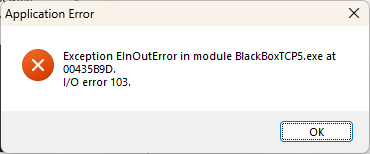
The following Error 103 can happen if the BlackBoxTCP5.ini is missing or is bad.
Assistance
If any further assistance is needed, please contact our Support team.
Related Articles